
v1.5.0 (8.10.2026)
Deutsch (English Version below)
Der Tagesplan
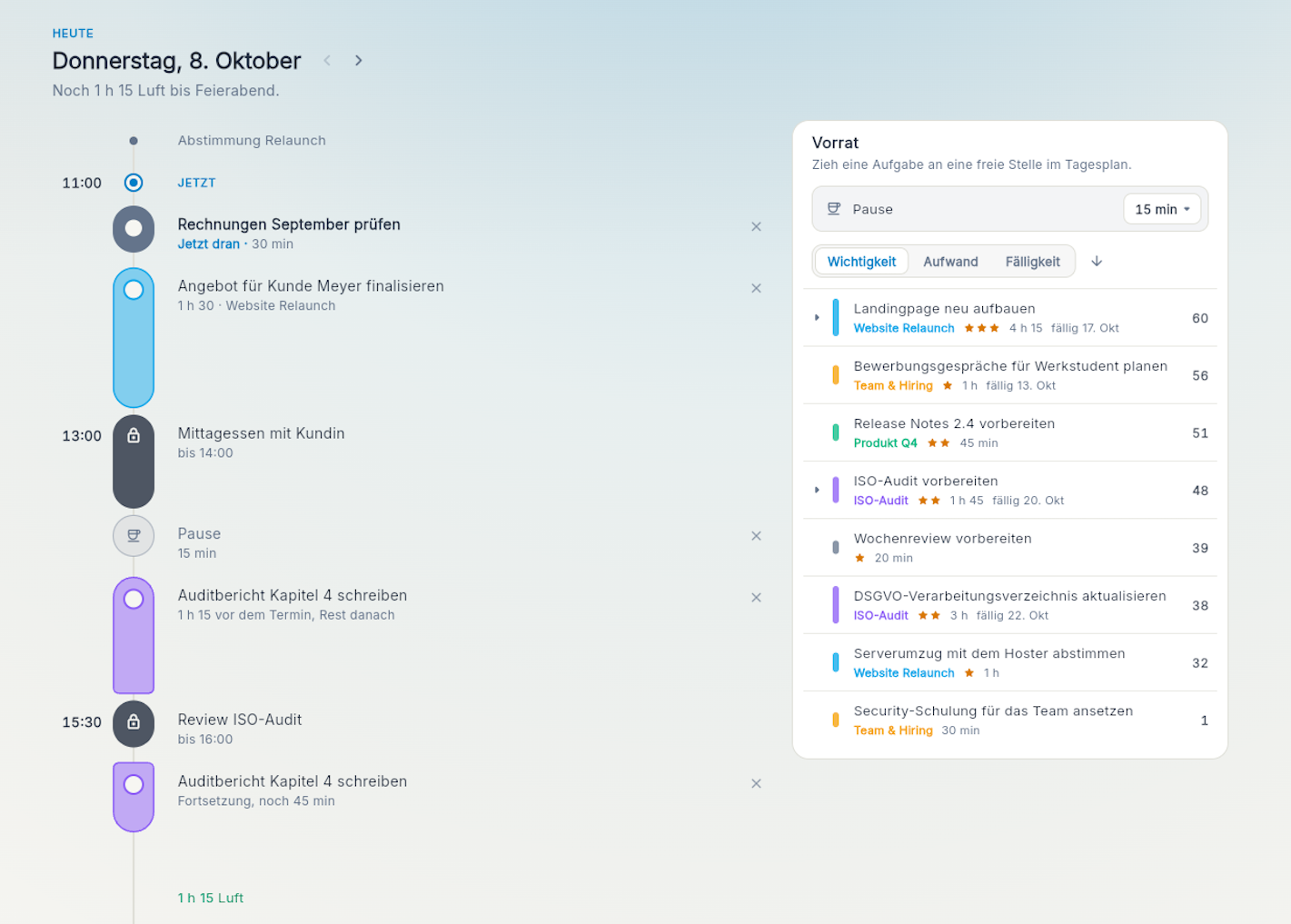
In Aevo brauchst du nicht zu planen. Das Board zeigt dir immer an, was gerade wichtig ist und auch, was du heute noch schaffen kannst. Manchmal ist es aber dennoch hilfreich, den Tag im Fokus zu sehen und zu überlegen, welche Tasks man zwischen zwei Meetings erledigen möchte. Deshalb stellen wir heute den "Tagesplan" vor.
Der Tagesplan zeigt dir ein Zeitband für den heutigen Tag, fügt deine Meetings automatisch ein und du ziehst die Dinge auf das Tagesband, die du heute erledigen möchtest. Aevo lässt dir dabei viele Freiheiten:
-
Solange du den Task nicht abhakst, wandert er weiter auf der Tageslinie - kein Verschieben, nur weil ein Anruf oder ein anderes Meeting dazwischenkam.
-
Du nimmst am Meeting nicht teil? Dann kannst du auch andere Tasks zu den Zeitpunkt auf den Tagesplan legen.
-
hat ein Task keine geschätzte Daue? Dann beeinflusst er die Zeitrechnung gar nicht - so kannst du einfach eine Liste anlegen für den Tag
Der Tagesplan für den heutigen Tag ist auch in der kostenlosen Version inklusive. In der Pro-Version kannst du auch die nächsten 2 Tage voraus planen.
Import
Du wechselst von einer anderen App zu Aevo? Dann nimm deine Daten mit. Aevo unterstützt ab sofort den Import via CSV, aus Todoist oder einem anderen Aevo-Konto.
Sicherheit
-
Aevo unterstützt jetzt eine 2-Faktor-Authentifizierung mittels TOTP. Aktiviere die 2FA optional in deinen Kontoeinstellungen.
-
CSV-Export gegen Formula-Injection gehärtet
-
OAuth-Workflow sicherheitstechnisch verbessert
-
CalDAV- und E-Mail Proxy gehärtet
Verbesserungen
-
Du möchtest mehr Aufgaben auf einen Blick sehen? Dann schalte im Board die Kompaktansicht ein
-
Das Board lädt jetzt besonders bei vielen Einträgen deutlich schneller
-
Neues Onboarding mit direkter Möglichkeit zur Verknüpfung eines Kalenders
-
Neuere Funktionen können jetzt auch einzeln an- bzw. ausgeschaltet werden (Tagesplan, Auswertungen, Listenansicht)
-
Aufgaben ohne Aufwandsschätzung verhalten sich jetzt in allen Funktionen identisch - sie werden insbesondere in Berechnungen von Aufwänden oder der Velocity eingerechnet.
Pro-Version
-
Neu registrierte Benutzer erhalten nun automatisch 14 Tage kostenlos die Pro-Version. Danach schaltet Aevo autpmatisch zurück auf Free, sofern kein Upgrade erfolgt
-
Empfiehl Aevo weiter: gib deinen persönlichen Empfehlungslink aus den Einstellungen weiter und erhalte 1 Monat Pro Kostenlos pro erfolgreicher Empfehlung.
Bugfixes
- Die Synchronisation zwischen Datenbank und Anwendung führt nun nicht mehr zu Unterbrüchen oder Reloads
macOS App
- Die macOS-App gibt nun einen Hinweis, wenn eine neue App-Version bereitsteht
English
Daily plan
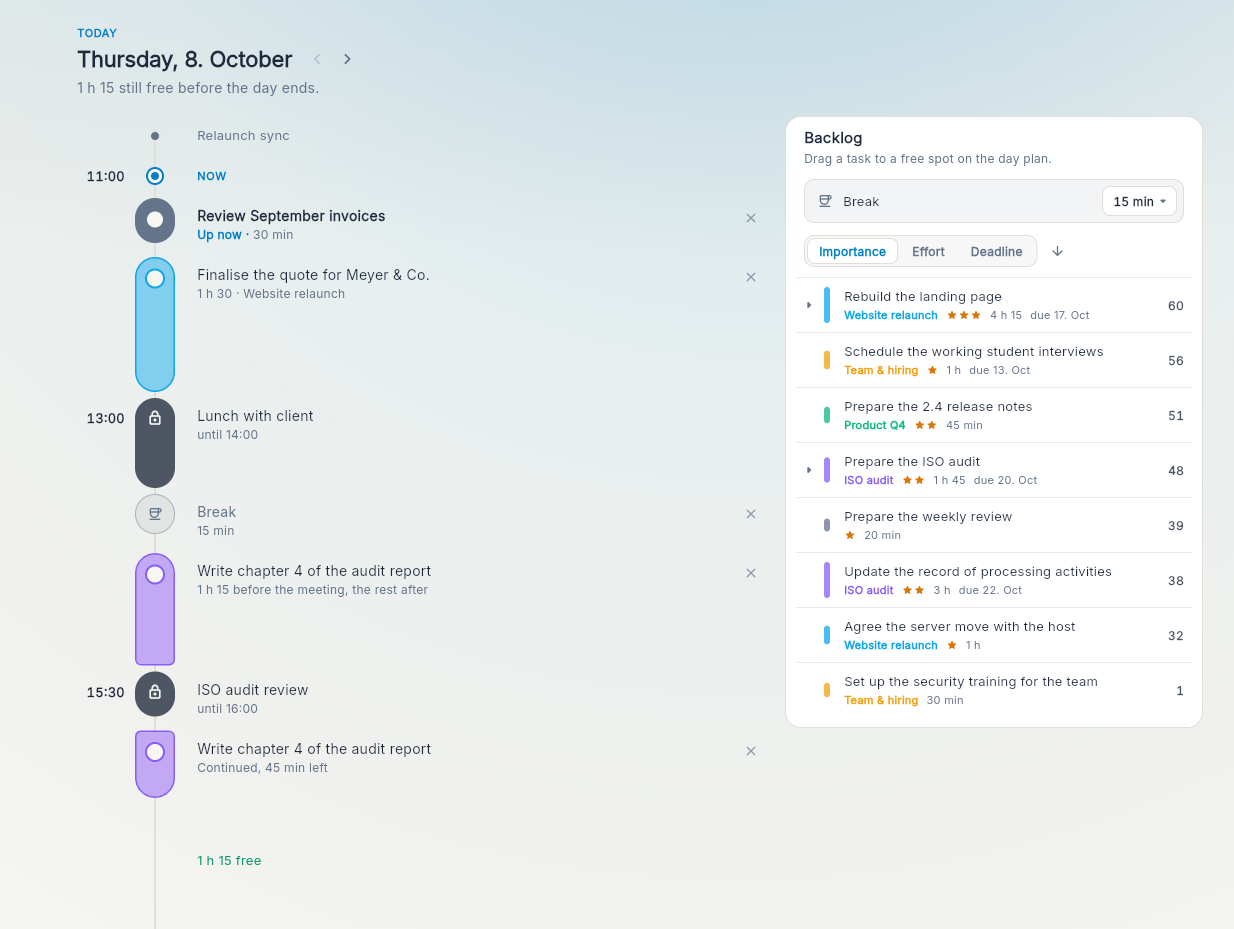
In Aevo, you don’t need to plan. The board always shows you what matters right now and what you can still get done today. Sometimes, though, it’s helpful to focus on the day and think about which tasks you want to tackle between meetings. That’s why we’re introducing the “Daily plan.”
The Daily plan gives you a timeline for today, automatically adds your meetings, and lets you drag the tasks you want to do today onto the timeline. Aevo gives you plenty of flexibility:
-
Until you check off a task, it stays on the daily timeline. It won’t move just because a call or another meeting got in the way.
-
Not attending a meeting? You can put other tasks on the Daily plan during that time.
-
Don’t have an estimated duration for a task? It won’t affect the time calculation, so you can simply make a list for the day.
The Daily plan for today is included in the free version. With Pro, you can also plan the next two days.
Import
Switching to Aevo from another app? Bring your data with you. Aevo now supports importing via CSV, from Todoist, or from another Aevo account.
Security
-
Aevo now supports two-factor authentication using TOTP. You can optionally enable 2FA in your account settings.
-
CSV exports are now hardened against formula injection.
-
The OAuth workflow has been improved for security.
-
The CalDAV and email proxies have been hardened.
Improvements
-
Want to see more tasks at a glance? Turn on compact view in the board.
-
The board now loads much faster, especially when it contains many items.
-
The new onboarding flow lets you connect a calendar right away.
-
You can now turn newer features on or off individually: Daily plan, reports, and list view.
-
Tasks without effort estimates now behave consistently across all features. In particular, they’re included in effort and velocity calculations.
Pro version
-
Newly registered users now automatically get 14 days of Pro for free. After that, Aevo automatically switches back to Free unless they upgrade.
-
Recommend Aevo: share your personal referral link from settings and get one month of Pro for each successful referral.
Bug fixes
- Synchronization between the database and the app no longer causes interruptions or reloads.
macOS app
- The macOS app now notifies you when a new version is available.